Setup guide6 min read
The student setup: a study and gaming desk on a small budget
Desk, chair, screen, keyboard, mouse, headset, mic, speakers and lamp for a bedroom or a dorm, built around the laptop you already own. Cheap parts that do their job, and where to spend first.
By Setuplify Lab

Some links on this page are affiliate links: we may earn a commission, at no extra cost to you. It never changes our picks. How we make money
This setup is for a student with a bedroom or a dorm room, a laptop already in the bag, and very little money for the rest. It has to handle long evenings of essays and revision, online classes and group calls, and some gaming when the work is done. The approach: put the money where your body and eyes spend the hours (the chair and the screen), and buy cheap but well-made parts for everything else.
We assume you already own a laptop. If you want a gaming PC as well, see the note at the end and our gaming setup for 1,500.
The parts
The desk
The IKEA LAGKAPTEN / ALEX is the default first desk for good reasons: a 140 x 60 cm white top, five drawers under one end for notes, chargers and the stuff that clutters a student room, and easy assembly. It is a light board, so keep heavy things spread out, and IKEA says it is not suitable for a screen stand, which rules out a clamp-on monitor arm. Keep the monitor on its own foot.
In the US, the FlexiSpot EN1 is an electric standing desk that costs less than this IKEA desk: a one-piece 48 x 24 in top, four memory presets and anti-collision, with no drawers. It is not sold in France.

FlexiSpot Desk
FlexiSpot EN1 One-Piece Standing Desk (48 x 24 in, Black)
- 1,219 mm
- Yes
The chair
The IKEA MARKUS is the chair we would buy before anything else on this list. It is rated for business use, has a tall mesh back with a headrest and a built-in lumbar pad, and IKEA covers it for 10 years, which is rare at this price. The armrests are fixed and the lumbar pad does not move, but for a first proper chair it is a huge step from a dining chair. If you game more than you study and like a racing look, the Razer Iskur V2 X in light grey fabric has a built-in lumbar arch and reclines to 152 degrees, with basic 2D armrests.
For long study days in a warm room, the all-mesh Sihoo M57 adds what MARKUS lacks: lumbar support that moves in height and depth, a tilting headrest and armrests that adjust in three ways. In France, the Amazon Basics high-back mesh chair is the cheapest certified chair we list, with an adjustable seat depth, though owner ratings are mixed.

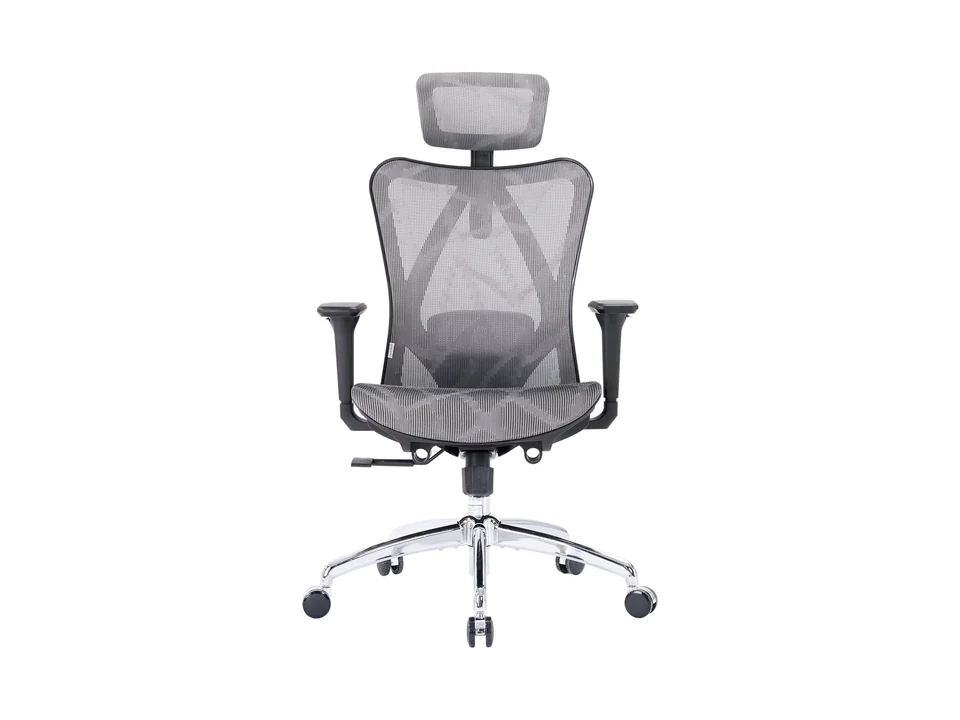

Amazon Basics Chair
Amazon Basics Ergonomic High-Back Mesh Office Chair (Gray)
- Ergonomic mesh

The screen
A second screen next to a laptop changes how you study: sources on one side, the essay on the other. The Dell 24 Plus S2425HSM is the screen we would buy first, in both markets: a white 24-inch 1080p IPS screen at 144 Hz whose stand adjusts in height, tilt, swivel and pivot, which is rare at this price. It connects over two HDMI ports, with no USB-C or DisplayPort. For gaming in France, the AOC 24G50F costs even less, a 24-inch 1080p IPS screen at up to 180 Hz that also makes games smooth. Its limits: text looks a bit soft at 1080p on 24 inches, the stand only tilts, and it has no USB-C.
If your laptop charges over USB-C, the ASUS ProArt PA278CV is the screen we would stretch for, in both markets. One USB-C cable carries video and up to 65 W of charging, a four-port USB hub takes the keyboard and mouse, and the 27-inch 1440p panel is factory calibrated, which helps with design or photo courses. It runs at 75 Hz, so it is not a gaming screen.

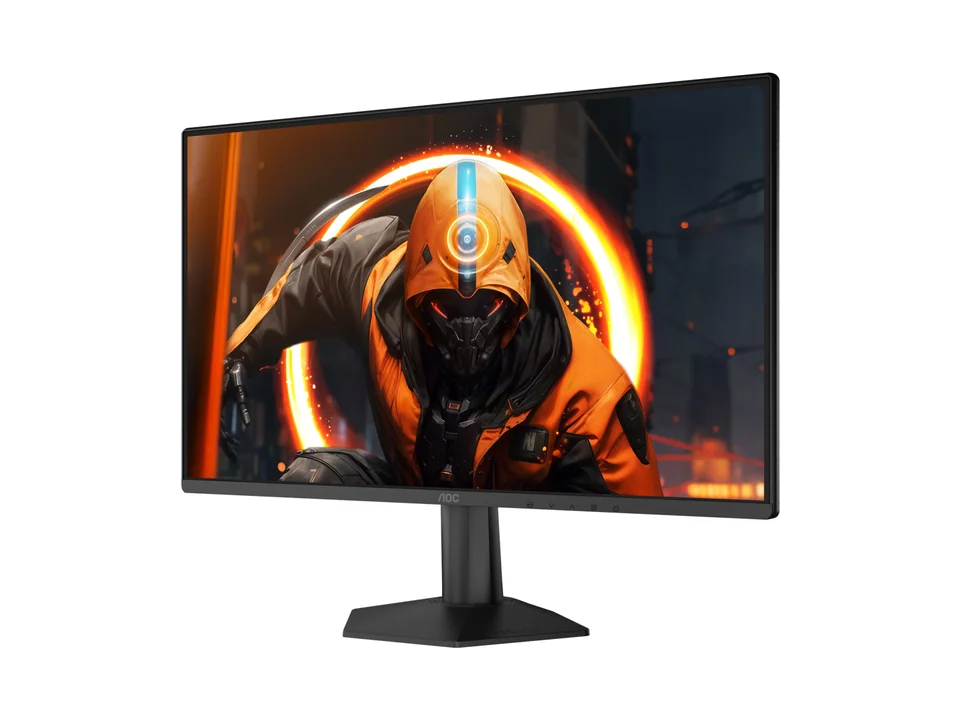
AOC Monitor
AOC Gaming 24G50F
- 23.8"
- 1920 × 1080
- 180 Hz

Connecting the laptop
If your laptop has only one or two USB-C ports, the Anker Nano USB-C Hub (8-in-1) adds HDMI outputs, USB ports and card readers, with charging passed through. Check the fine print: the laptop's port needs DisplayPort and Power Delivery support, macOS mirrors two external screens instead of extending them, and Linux is not supported. To raise the laptop to eye level as a second screen, the Razer Adjustable Laptop Stand adjusts from about 5 to 28 cm. It is good value in France and a bit expensive in the US.


Keyboard and mouse
The Razer Ornata V3 X is a quiet, spill-resistant full-size keyboard with a wrist rest in the box. That suits a shared room late at night. If you type more than you game, the Logitech Wave Keys puts your wrists in a more natural position with a cushioned palm rest, runs for years on two AAA batteries and switches between three devices. For the mouse, the wired Razer Cobra is light and simple, and the Logitech G305 is the wireless pick, with a receiver that stores inside the mouse for the trip home. The wired Logitech G203 LIGHTSYNC is the cheapest proper gaming mouse, with settings stored on the mouse. For the library or a sleeping roommate, the Logitech M240 Silent has near-silent clicks and runs up to 18 months on one AA battery; it connects over Bluetooth only and has no side buttons.


Headset and microphone
The HyperX Cloud Stinger 3 is a comfortable first headset with a boom mic that mutes when you flip it up. The Razer BlackShark V2 X is even lighter at 240 g and works with anything that has a 3.5 mm jack. Both mics are fine for team chat. For online classes, oral exams and group calls where you want to sound clear, the Razer Seiren V3 Mini is a big step up from a headset mic for very little money, with tap-to-mute and a tiny footprint. The off-white Logitech G Yeti Orb is the other cheap USB mic, plug and play over USB-C. And if your laptop camera makes you look grey in online classes, the Elgato Facecam Neo films 1080p at 60 fps with autofocus and a privacy shutter, without drivers.


Speakers and light
The Creative Pebble V3 speakers run on one USB-C cable and beat laptop speakers for videos and background music. If you can spend more, the white Edifier MR4 monitor speakers sound much fuller and are especially good value in France, but they need a cable, as there is no Bluetooth.
For light, the IKEA TERTIAL is the cheapest way to get focused light on a notebook or keyboard. Add a warm LED bulb, sold separately, and aim it away from the screen.


Mat and cables
The Logitech Desk Mat Studio Series gives a soft, quiet surface for the keyboard and mouse. For cables, the IKEA TRIXIG set has adhesive holders that stick to the back of the desk (skip the nail-in clips in a rented room), and the IKEA FÖRSÄSONG tray clamps under the desk without drilling and keeps the power strip off the floor.


IKEA Cable organiser
IKEA TRIXIG 150-Piece Cable Management Set
- Complete kit

IKEA Cable organiser
IKEA FÖRSÄSONG Cable Management Tray
- Under-desk tray
Where the money goes
The chair is the largest line, and the screen comes next: they are the two parts you use for every hour of study. The desk follows. Everything else, from the keyboard and mouse to the headset, mic, speakers, lamp, mat and cable kit, sits in the budget range of its category, and together they cost less than the chair and the screen.
If money is very tight, buy in this order: chair, screen, lamp, then the rest as you go. A laptop on a stand with a cheap keyboard and mouse already beats hunching over a laptop for hours.
What to upgrade first later
- The screen, from 1080p to a sharper 1440p panel, if you started with the AOC.
- The light, from the TERTIAL to a monitor light bar for late nights. See our list of cheap desk upgrades.
- The chair, once your budget allows adjustable armrests and lumbar support.
- A gaming PC. In France, the Materiel.net PC Gamer Blink is the cheapest assembled tower with an RTX 50 card we found; in the US, the ZOTAC MEK 5050. Both target 1080p and are covered in our budget gaming setup. The gaming setup for 1,500 goes one step up.
Short on floor space as well as money? The small room setup measures every part, and the quiet laptop desk keeps a shared room quiet. For more headset options, see the best gaming headsets. Or choose the student use case in the Setup Builder and let it build the desk for your budget.
Written by
Setuplify Lab, Editorial team
The Setuplify team builds, photographs and takes apart desk setups so you can pick parts with confidence.
See it on a desk
Setups from this guide, with every component listed.

First Light
A first gaming setup in a bedroom, spending where it counts.
$5706 of 8 parts sold here8 components

Studio Loft
A quiet bamboo desk in a sage green bedroom that doubles as a study.
$1,5196 components
Keep reading

Best of 6 min read
The best cheap desk upgrades that change how your setup feels
Small purchases with a big effect: a monitor arm, a desk mat, a cable kit, a lamp, a light bar, a hub, a headset stand, a laptop stand and speakers. What each one fixes, and who can skip it.

Setup guide 8 min read
The budget gaming setup: the cheapest full desk that plays recent games
An entry RTX 5050 tower, a fast 1080p screen, a cheap mouse, keyboard and headset, then a real chair and a desk. The full budget gaming desk, slot by slot, and how it differs between the US and France.

Setup guide 5 min read
The small room setup: a full gaming and work desk in a corner
A compact PC, a 24 to 27 inch screen, a 75% keyboard and a shallow desk: how to fit a real setup into a bedroom or a corner, with the measurements that matter for each slot.

Setup guide 8 min read
The quiet laptop desk: a work setup for a small apartment or a shared room
A laptop at eye level, one external screen, a compact keyboard and a silent mouse on a small desk. The work setup that fits a studio flat or a shared bedroom without waking anyone, slot by slot.

Best of 5 min read
The best mice for work: ergonomic, vertical and budget picks
The mice we would put on a work desk today: a full-featured ergonomic mouse, a vertical mouse for sore wrists, a work-and-play option, a budget pick for students and a silent mouse for laptops.
Questions people ask
What should a student buy first for a desk setup?
A proper chair, then a second screen for the laptop, then a lamp. These three change long study evenings the most. Keyboard, mouse, headset and the rest can come over time.
Is the IKEA MARKUS a good chair for students?
Yes. It is rated for business use, has a tall mesh back with a headrest and a built-in lumbar pad, and a 10-year warranty. Its armrests and lumbar pad are fixed, so it suits people who do not need fine adjustments.
Do I need a microphone for online classes?
A headset mic is fine for team chat, but a small USB mic like the Razer Seiren V3 Mini makes you much clearer in classes, oral exams and group calls, for very little money.