Setup guide6 min read
The home office setup: a work-from-home desk that lasts
Mac mini or laptop, a sharp 4K USB-C screen, an ergonomic keyboard and mouse, the right chair and desk, plus the webcam, headset and light that make calls look and sound professional.
By Setuplify Lab

Some links on this page are affiliate links: we may earn a commission, at no extra cost to you. It never changes our picks. How we make money
This is the desk for people who work from home most days: eight hours of documents, code, spreadsheets and video calls. The goal is simple. Your back and wrists should feel fine at six in the evening, the screen should be sharp enough that reading is not tiring, and colleagues should see and hear you clearly. Everything here is chosen for those three things, not for looks or games.
You can build it around two kinds of computer. A desktop such as the Mac mini stays on the desk for good. A work laptop plugs in each morning through one cable and leaves with you. Both paths share the same screen, peripherals and furniture.
The parts
The computer: Mac mini or your laptop
The Apple Mac mini (M6) is the tidiest desktop you can buy for this job. It is 12.7 cm square and 5 cm tall, so it disappears under the monitor, and the base model with 16 GB of memory handles office work, coding and photo editing without effort. Two USB-C ports and a headphone jack sit on the front, and it drives up to three external displays. The catch: memory and storage cannot be upgraded later, and 256 GB fills up fast, so choose the configuration at purchase or plan external storage.
Apple Desktop computer
Apple's 12.7 cm square desktop with the M6 chip, 16 GB of memory, 256 GB SSD and Thunderbolt 4, HDMI and 2.5Gb Ethernet.
Mini PCmacOS16 GB
If your employer gives you a laptop, raise it to eye level and give it one cable. The Razer Adjustable Laptop Stand lifts it from about 5 to 28 cm so it can serve as a second screen. For ports, the Anker Nano USB-C Hub (8-in-1) adds two HDMI outputs, fast USB and card readers, but read the fine print: on macOS both external screens mirror the same image, and it does not support Linux. The CalDigit TS5 is the premium answer: one Thunderbolt 5 cable charges a laptop at up to 140 W and feeds monitors, fast drives and 2.5 Gigabit Ethernet. It has no HDMI or DisplayPort output, so screens connect through its Thunderbolt ports.
Between the two sits the Anker Prime Docking Station: its own 160 W power supply charges the laptop at up to 100 W, two HDMI outputs drive two screens at 4K 60 Hz, and Ethernet, an audio jack and plenty of USB ports cover the rest of the desk. It uses USB-C at 10 Gbps rather than Thunderbolt, and on macOS its two screens mirror. It suits a Windows laptop with two monitors best.


Anker Accessory
Anker Prime Docking Station (14-in-1, Dual Display, 160W)
- Dock / hub

The monitor: 4K over USB-C
The Dell 27 Plus S2725QC is the screen we would put on most home office desks. At 4K on 27 inches, text is far sharper than on a 1440p screen of the same size, which you feel after a long day of reading. One USB-C cable carries video and up to 65 W of charging to a laptop, a small hub adds USB ports, and the white stand adjusts in height, tilt, swivel and pivot. The 65 W can be short for large 16-inch workstation laptops, which then need their own charger.
If you live in spreadsheets or code, the Dell 34 Plus S3425DW fits three windows side by side at 3440 x 1440, with the same one-cable USB-C setup. The Dell UltraSharp U2724D has a beautiful IPS Black panel and a 10 Gbps hub, but its USB-C port carries data only, so a laptop still needs a video cable and its charger. For a bigger 4K picture on a desktop like the Mac mini, the white Dell 32 Plus S3225QS gives you 32 inches at 120 Hz with deep VA contrast, enough to put two full documents side by side. It has no USB-C, so a laptop needs an HDMI cable and its own charger. Our monitor picks for work compare them in detail.


An arm lets you set the screen at the right height and push it back for more desk depth. The Ergotron LX Pro is the one we would buy in both markets: it holds one screen up to 34 inches and 10 kg, lifts it through 33 cm, hides the cables better than the original and carries a 10-year warranty. The original Ergotron LX is still sold in France.


Ergotron Monitor arm
Ergotron LX Desk Monitor Arm
- 1
Keyboard and mouse
The Logitech MX Keys S and the MX Master 3S are the default pair for a reason: quiet, stable keys that switch between three computers, and a sculpted mouse with a free-spinning wheel and a thumb wheel for timelines and spreadsheets. The Master 3S sold today is the Bluetooth Edition, with no USB receiver in the box.
If your wrists already complain, change the shape rather than the brand. The Logitech Wave Keys follows a gentle wave with a cushioned palm rest and no learning curve, and the Logitech Lift holds your hand at a 57 degree handshake angle. Lift is sized for small to medium hands.
On a smaller desk, the Logitech MX Keys Mini keeps the MX Keys typing feel without the number pad, so the mouse sits closer to your shoulder. If you prefer mechanical keys, the Logitech MX Mechanical Mini uses Tactile Quiet switches in a 75% layout, quiet enough for calls, and includes a Logi Bolt receiver. Our quiet laptop desk guide builds a whole compact desk around them.


Logitech Mouse
Logitech MX Master 3S Bluetooth Edition
- 141 g
- Ergonomic
- Wireless


Logitech Mouse
Logitech Lift Vertical Ergonomic Mouse
- 125 g
- Vertical
- Wireless
The chair
This is where a home office earns its name. The Sihoo Doro C300 is our mid-range pick: all mesh, with lumbar support that follows your spine on its own and a recline that senses your weight, so it works well without fiddling. The Herman Miller Aeron is the buy-once chair for full-time desk work, with adjustable PostureFit SL support and a 12-year warranty. On a small budget, the IKEA MARKUS is rated for business use and covered for 10 years, but its armrests and lumbar pad are fixed. If you are tall or sit all day, the Sihoo Doro C300 Pro keeps the C300's self-adjusting comfort and adds the seat depth adjustment and six-way armrests the standard model lacks.


The desk
Standing for part of the day is the best habit a sit/stand desk buys you. The FlexiSpot E7 has two motors, a 160 kg rating, memory presets and a long warranty, for a mid-range price. The IKEA MITTZON is the tidy option: a cable tray and a storage module for the power strip come with it, but its load limit is 80 kg and it stores only two heights.


Camera, headset and light for calls
Laptop cameras flatter nobody. The Logitech Brio 500 films 1080p with autofocus, copes with a window behind you and has a privacy shutter. If you spend your days on camera, the Logitech MX Brio moves to 4K and handles dim rooms better. If you stand up, teach or present at a whiteboard, the Insta360 Link 2 sits on a small gimbal that follows you, with AI tracking, HDR and a camera that flips down for privacy.


For calls, the Logitech Zone Vibe 100 has a boom mic that mutes when you flip it up and pairs with a laptop and a phone at once. If you need to shut out a noisy home, the Sennheiser MOMENTUM 4 Wireless adds adaptive noise cancellation and up to 60 hours of battery, at the cost of a boom mic. Our headphones for work and calls cover the rest.


Sennheiser Headset
Sennheiser MOMENTUM 4 Wireless
- Headphones
- Wired + wireless
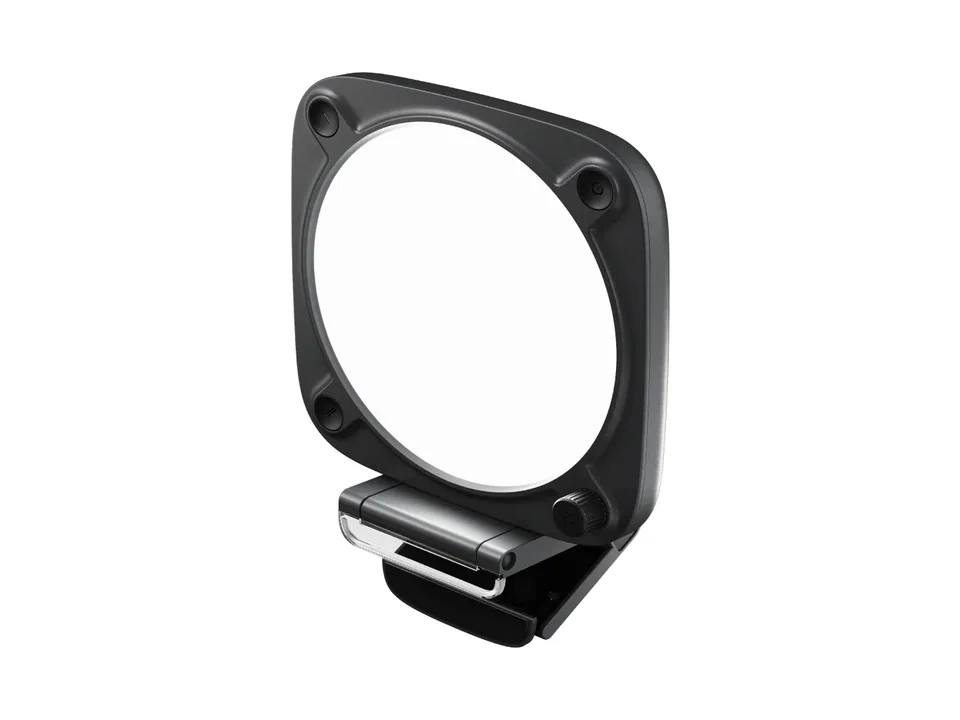
Light the desk and your face separately. The BenQ ScreenBar Halo 2 lights the keyboard without glare on the screen and turns itself on when you sit down. The Elgato Key Light clamps to the desk and puts soft, even light on your face for calls. Two smaller, cheaper options: the BenQ ScreenBar Pro lights a wide desk and switches itself on and off with a motion sensor, without the Halo 2's backlight, and the Elgato Key Light Neo clips on the monitor and runs from USB, at full brightness only with a 3A power supply sold separately. Our video call guide puts light, camera and mic in the right order.


Finally, the Orbitkey Desk Mat gives the desk a clean, wipeable surface with a hidden pocket for loose papers. It needs a desk around 70 cm deep or more next to a 27-inch monitor.

Orbitkey Desk mat
A large vegan leather desk mat with a hidden document pocket and a toolbar that holds pens and a magnetic cable clip.
896 x 423 x 4.9 mmLeather
Where the money goes
Spend in this order: chair, screen, desk, then everything else. The chair and the screen are the two parts you use every minute of the working day, and they are where cheap choices hurt most. A sit/stand desk is the third line. The keyboard, mouse, webcam and headset together cost less than a good chair. The light and the mat are small lines that make the desk pleasant to sit at.
On the laptop path, the dock is the variable: the Anker hub is a small line, the CalDigit TS5 a large one. Pick by what your laptop needs to charge and how many screens it drives.
What to upgrade first later
- The chair, if you started with MARKUS and sit all day. Fine adjustments matter more as the hours add up. See our office chair picks.
- The webcam and light, if you are on camera a lot. Light changes more than the camera does.
- A monitor arm, to free the desk and set the screen height exactly. Our ergonomic desk setup guide shows the right heights.
- The desk, if you started on a fixed one.
Short on space? The small room setup squeezes this desk into a corner, and the quiet laptop desk fits a work corner into a studio flat. Our Quiet Hours setup shows the premium version of this desk, built for long days of calls. To check your own combination, open the Setup Builder and pick the work use case.
Written by
Setuplify Lab, Editorial team
The Setuplify team builds, photographs and takes apart desk setups so you can pick parts with confidence.
See it on a desk
Setups from this guide, with every component listed.

Standing Ops
A sit/stand home office set up for back-to-back video calls.
$1,84511 of 12 parts sold here12 components

Quiet Hours
A calm home office in bamboo and felt, built for long days of video calls and focused work.
$2,48610 components

Blanc Studio
An all-white Mac home office that stays bright, quiet and tidy.
$2,97110 components
Keep reading
Best of 4 min read
The best monitors for work, coding and creative jobs
Sharp 4K for text, one-cable USB-C for laptops, an ultrawide for coding and a calibrated screen for photos: the work monitors we recommend, and who each one suits.
Best of 6 min read
The best ergonomic office chairs for long workdays
Three office chairs we recommend without hesitation, from a small budget to the chair you keep for ten years, with the limits of each and how to set it up.
How to 4 min read
How to set up an ergonomic desk, step by step
Chair first, then desk height, monitor height and distance, keyboard and mouse, and lighting: the order that works, with our gear picks for each step.
How to 8 min read
How to look and sound good on video calls
Camera height, light, webcam, microphone and headset, in the order that matters: what to fix for free, what to buy, and three kits for a home office, from a small budget to all-day meetings.
Setup guide 8 min read
The quiet laptop desk: a work setup for a small apartment or a shared room
A laptop at eye level, one external screen, a compact keyboard and a silent mouse on a small desk. The work setup that fits a studio flat or a shared bedroom without waking anyone, slot by slot.
Questions people ask
What should I buy first for a home office?
The chair, then the screen. They are the two parts you use every minute of the working day. A sit/stand desk comes third, and the keyboard, mouse, webcam and headset together cost less than a good chair.
Can one USB-C cable connect and charge my laptop on a monitor?
Yes, with a monitor that supports USB-C video and power, like the Dell 27 Plus S2725QC or the Dell 34 Plus S3425DW, both up to 65 W. Large 16-inch workstation laptops may need more power. The Dell UltraSharp U2724D's USB-C port carries data only.
Is the Mac mini good enough for working from home?
Yes. The M6 Mac mini with 16 GB handles office work, coding and photo editing easily and drives up to three external displays. Choose the storage at purchase: memory and storage cannot be upgraded, and 256 GB fills up fast.