How to4 min read
How to set up an ergonomic desk, step by step
Chair first, then desk height, monitor height and distance, keyboard and mouse, and lighting: the order that works, with our gear picks for each step.
By Setuplify Lab

Some links on this page are affiliate links: we may earn a commission, at no extra cost to you. It never changes our picks. How we make money
An ergonomic desk setup is mostly about order. Start with the chair, set the desk to the chair, then the screen to your eyes, then your hands, then the light. Do it the other way round and you spend the day adapting your body to the furniture. Here is the sequence, with the gear we would pick for each step if yours does not adjust.
1. Chair: set your base
Sit all the way back. Raise or lower the seat until your feet are flat on the floor and your knees sit at about the height of your hips. Leave two or three fingers between the front edge of the seat and the back of your knees. Then place the lumbar support in the curve of your lower back.
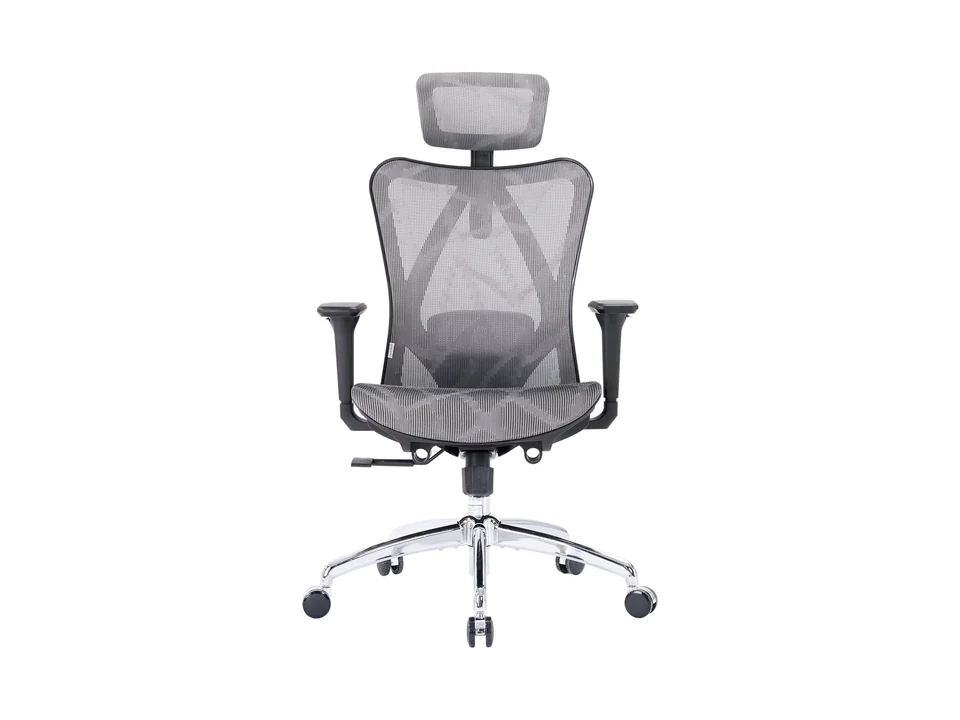
If your chair cannot do this, it is the first thing to replace. The Sihoo Doro C300 is our pick for most people: its lumbar support follows your spine on its own and the recline sets itself from your weight, so it is comfortable without fiddling. If you are tall or your thighs feel unsupported, the Doro C300 Pro adds the seat depth adjustment the C300 lacks. On a small budget, the Sihoo M57 has a lumbar pad you can move up, down, in and out. Our best office chairs and best budget office chairs guides cover more options.

2. Desk: match it to your elbows
With your shoulders relaxed and your elbows bent at about 90 degrees, your forearms should rest flat on the desk, roughly at elbow height. A typical fixed desk sits around 73 cm (28 3/4 in), which suits some people and not others.
If your desk is too high, raise the chair and add a footrest such as the IKEA ÖVNING. If you can choose, a standing desk solves the problem properly: you set the exact sitting height, and you can stand for part of the day. The FlexiSpot E7 goes from 58 to 123 cm before the top and stores your heights as presets, so switching takes one button. See our standing desk picks for more.
FlexiSpot Desk
A dual-motor standing desk frame rated for 355 lb, sold here with a 63 in (160 cm) laminate top.
1,600 mmYes
3. Monitor: height and distance
- Height: the top of the screen at or slightly below eye level, so you look slightly down at the middle of the screen.
- Distance: roughly an arm's length. Larger screens sit further back.
- Angle: straight in front of you with one screen. With two, put the main one in front and the second to the side, or center the join if you use both equally.
If your monitor's stand only tilts, a monitor arm fixes height and distance at once and frees the desk. The Ergotron LX Pro holds screens up to 34 inches and moves smoothly; our monitor arm guide covers cheaper and dual options.
Ergotron Monitor arm
The updated single LX arm in matte black, for screens up to 34 in and 4 to 22 lb, with tidier cable management and a 10-year warranty.
1
4. Keyboard and mouse: keep your wrists straight
Place the keyboard close to the desk edge, with the letter keys centered in front of you (on a full-size keyboard, the number pad pushes the mouse further out). Keep the mouse right next to it, so your arm stays close to your body.
Two pieces of gear help most people:
- A keyboard with a palm rest, such as the Logitech Wave Keys: a wave-shaped layout with a cushioned memory foam rest and no learning curve.
- A vertical mouse such as the Logitech Lift, which holds your hand at a 57-degree handshake angle. It is sized for small to medium hands and comes in a left-handed version.
Our guides to keyboards for work and mice for work compare more options.


Logitech Mouse
Logitech Lift Vertical Ergonomic Mouse
- 125 g
- Vertical
- Wireless
5. Lighting: light the desk, not the screen
Avoid working in a dark room with a bright screen, and avoid lamps that shine on the monitor. A monitor light bar like the BenQ ScreenBar Halo 2 lights the desk with no glare on the screen and adds a backlight that softens the contrast with the wall behind. In a brighter room, the ScreenBar Pro gives the same wide desk light for less and turns itself on when you sit down. Our monitor light bar guide compares them, and our desk lighting guide also has a budget lamp.
6. Move
The best setup still needs breaks. Stand up, look away from the screen, and if you have a standing desk, change position a few times a day rather than standing for hours.
Checklist
- Feet flat, knees at hip height, lumbar support in the curve of your back.
- Desk at elbow height.
- Top of the screen at eye level, about an arm's length away.
- Keyboard close, mouse right beside it, wrists straight.
- Light on the desk, not on the screen.
Want to check a whole setup at once? Build it in the Setup Builder, or see our home office setup.
Written by
Setuplify Lab, Editorial team
The Setuplify team builds, photographs and takes apart desk setups so you can pick parts with confidence.
See it on a desk
Setups from this guide, with every component listed.

Standing Ops
A sit/stand home office set up for back-to-back video calls.
$1,84511 of 12 parts sold here12 components

Night Shift Dev
A curved ultrawide, a vertical screen and a split keyboard for long coding nights.
$4,6449 of 10 parts sold here10 components

Quiet Hours
A calm home office in bamboo and felt, built for long days of video calls and focused work.
$2,48610 components
Keep reading

Best of 6 min read
The best ergonomic office chairs for long workdays
Three office chairs we recommend without hesitation, from a small budget to the chair you keep for ten years, with the limits of each and how to set it up.
Best of 7 min read
The best budget office chairs that still support your back
Cheap office chairs with real lumbar support: two Sihoo mesh chairs, two IKEA classics with a 10-year warranty, Amazon's own mesh chair in France, and when to spend a little more.

Best of 7 min read
The best standing desks, plus the fixed desk to buy on a budget
Four dual-motor sit/stand desks for different rooms and setups, and the cheap fixed desk to start with if a standing desk is not in the budget yet.

Best of 6 min read
The best monitor arms for one or two screens
A buy-once arm, a cheap gas spring arm, a dual arm for two screens and a white arm for light setups, plus the four checks to make before you order.

Best of 7 min read
The best monitor light bars, and the clip-on lights for your face
Three BenQ ScreenBars for three kinds of desk, from the USB-powered original to the Halo 2 with its backlight, plus the monitor-top key lights that fix how you look on calls.

Setup guide 8 min read
How to build a one-cable laptop desk setup
Plug in one USB-C cable and get your monitors, keyboard, network and charging: which dock fits your laptop, how to raise or park the laptop, and where to hide the rest.

Setup guide 6 min read
The home office setup: a work-from-home desk that lasts
Mac mini or laptop, a sharp 4K USB-C screen, an ergonomic keyboard and mouse, the right chair and desk, plus the webcam, headset and light that make calls look and sound professional.
Questions people ask
How high should my monitor be?
The top of the screen at or slightly below eye level, about an arm's length away, so you look slightly down at the middle. If your monitor stand does not adjust in height, a monitor arm or a laptop stand fixes it.
What is the right desk height?
The height where your forearms rest flat with your shoulders relaxed and your elbows at about 90 degrees, once your chair is set with your feet flat on the floor. It differs from person to person, which is why a height-adjustable desk helps; on a fixed desk, raise the chair and add a footrest.
Is a vertical mouse better for your wrist?
A vertical mouse like the Logitech Lift holds your hand at a handshake angle (57 degrees on the Lift) instead of flat on the desk, which many people find more comfortable over long days. Check your hand size first: the Lift is made for small to medium hands.