Best of6 min read
The best desk lighting: light bars, key lights, ambient bars and lamps
The right light for each job: a monitor light bar for work, a cheap lamp to start, a key light for your camera, and ambient light behind the screen or on the wall.
By Setuplify Lab

Some links on this page are affiliate links: we may earn a commission, at no extra cost to you. It never changes our picks. How we make money
Our picks
Ranked in the order we would recommend them. Specs and prices come from each product page.
- 1$179.10Setuplify score: 8.8/10Check price(Affiliate link)
- 2

BenQ ScreenBar Pro (Black)
Long work and coding sessions on a large monitor
$139Setuplify score: 8.6/10Check price(Affiliate link) - 3
 $19.99Setuplify score: 6.8/10Check price(Affiliate link)
 - 4

Elgato Key Light
Streamers and video callers who want their face evenly lit
$179.99Setuplify score: 8.5/10Check price(Affiliate link) - 5
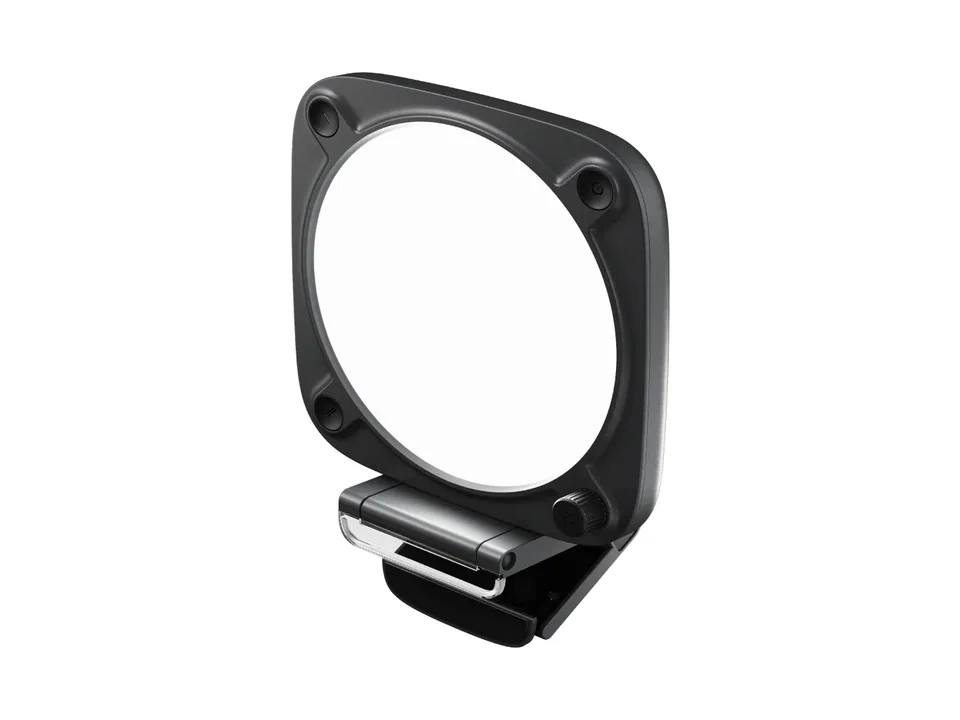 Best compact
Elgato Key Light Neo (Black, with monitor mount)
Video calls and streaming from a monitor-top light
$89.99Setuplify score: 8.4/10Check price(Affiliate link) - 6

Philips Hue Play Light Bar (single pack)
Colored backlighting behind a gaming monitor
$109.99Setuplify score: 8.0/10Check price(Affiliate link) - 7

Elgato Light Strip Pro
Ambient RGB light behind a streaming or gaming desk
$59.99Setuplify score: 7.6/10Check price(Affiliate link) - 8

Nanoleaf Lines 60° Starter Kit (9 Lines)
A camera-facing wall behind a streaming or gaming desk
$119.99Setuplify score: 8.2/10Check price(Affiliate link)
For most people, the best desk light is a monitor light bar, and the one we recommend is the BenQ ScreenBar Halo 2: it lights your desk without reflecting on the screen and adds a soft backlight behind the monitor. On a tight budget, the IKEA TERTIAL with a good bulb does the basic job for very little. For video calls and streaming, the Elgato Key Light lights your face, and for color behind the screen or on the wall, the Philips Hue Play and the Nanoleaf Lines are the two to look at.
Three jobs, three kinds of light
Most desk lighting mistakes come from asking one light to do everything. Think of three separate jobs:
- Task light on the desk surface, so you can read paper, find keys and avoid working in a dark room with a bright screen. A light bar or a lamp.
- Camera light on your face, so you look like yourself on calls and streams. A key light.
- Ambient light behind the screen or on the wall, which lowers the contrast between a bright monitor and a dark room and makes the setup look finished. A light bar or wall panels.
A work desk only needs the first. A streaming desk needs all three.
How we picked
- Light where you need it. A task light must light the desk without glare on the screen; a camera light must be soft enough to flatter.
- Controls you will actually use. Presence sensors, apps and dials all appear here, and we say what each light needs to work (a bridge, an outlet, an app).
- Honest about brightness. Some lights are decoration, not illumination. We say which.
Best overall: BenQ ScreenBar Halo 2
The ScreenBar Halo 2 sits on top of your monitor and aims its light down at the desk with an asymmetric beam, so nothing bounces back off the screen. BenQ quotes more than 1,000 lux at the center and 500 lux over an 85 x 50 cm area, with a CRI of 95 or more, which is plenty for paper and keyboard. The three-zone backlight behind the monitor is what makes it special for evening use: it softens the contrast between the screen and a dark wall, and it tunes from 2700 K to 6500 K like the front light.
A rechargeable wireless dial handles brightness and color temperature, and an ultrasonic sensor turns the light on when you sit down and off when you leave. The clip fits screens from 0.43 to 6 cm thick, curved models from 1000R to 1800R included.
BenQ Light
A 50 cm monitor light bar with a front light, a wide backlight and a wireless dial, for flat and curved screens.
Monitor light bar
Skip it if you want app or smart home control: there is none, only the dial and its touch panel. It also needs a USB-C power source (an adapter is in the box), and it is expensive for a desk light.
If you do not need the backlight, the ScreenBar Pro gives the same wide front light for less, with a presence sensor and touch controls on the bar. Our best monitor light bars guide compares the three ScreenBar models.
Best budget pick: IKEA TERTIAL
The TERTIAL has been in IKEA's range since 1998, and it is still one of the cheapest ways to get focused light on a desk. The spring-balanced steel arm and the head both adjust, and the lamp clamps to the desk edge or mounts on the wall. The bulb is sold separately, which means you choose the light: a warm LED for evenings, or a smart bulb if you want app control.
IKEA Light
IKEA's classic steel architect lamp: it clamps to the desk edge, the arm and head adjust, and it costs very little.
Desk lamp
Skip it if you work mostly on screen in a dark room: a plain lamp can reflect on the monitor if badly aimed. Place it to the side of the screen, not in front, and point it at the desk.
Best for video calls and streaming: Elgato Key Light
The Key Light is a full-size LED panel on a telescopic pole that clamps to the desk. Its 160 LEDs shine through a diffuser and opal glass, so the light on your face is soft rather than harsh, and it puts out up to 2,800 lumens from 2900 to 7000 K with a CRI above 94. You control it over Wi-Fi from the Control Center app on a computer or phone, from a Stream Deck, or with the buttons on the light.
Put it slightly to one side of your webcam and a little above eye level, and your camera image improves more than with most webcam upgrades. Our best webcams and streaming setup guides go further.
Elgato Light
A 2,800-lumen Wi-Fi LED panel on a desk clamp pole, adjustable from 2900 to 7000 K from your computer or phone.
Key light
Skip it if your desk is thicker than 6 cm (the clamp will not fit) or you want color: it is white light only, and it needs a mains outlet.
Smaller, on the monitor: Elgato Key Light Neo
No room for a pole on the desk? The Key Light Neo is a 15 cm square, edge-lit panel that sits on the monitor with the included mount and runs from USB. It covers the same 2900 to 7000 K range with a CRI above 94, but its brightness depends on the power source: about 400 lumens from USB-A, 700 from USB-C and 1,000 with a 3 A power supply that is sold separately. It lights the face in our Pastel Stream setup.
Elgato Light
A compact square key light that clips on your monitor, runs from USB and reaches 1000 lumens with a 3A power supply.
Key light
Best ambient light behind the screen: Philips Hue Play
The Hue Play light bar washes the wall behind your monitor in any color, or in white from 2000 K to 6500 K. Stand it upright behind the screen, lay it flat or fix it to the back of the monitor with the included mounts. It puts out 500 lumens at 4000 K, and the power supply can feed up to three bars, so you can add a second one later on the same plug. It works with Alexa, Google Home, Apple Home and SmartThings.
Philips Hue Light
A small smart light bar that washes the wall behind your monitor or TV in color, controlled from the Hue app.
Monitor light bar
Skip it if you do not have a Hue Bridge and do not plan to buy one: the bar needs it. Syncing the light with what is on screen also needs a Hue sync box or the Sync TV app.
Want gradients along the desk instead, with no bridge? The Elgato Light Strip Pro is a 2 m Wi-Fi strip whose LEDs each show their own color, controlled from Control Center or a Stream Deck. It cannot be extended past 2 m, and it was out of stock on Elgato's French store when we checked.
Best wall light for streams: Nanoleaf Lines
The Nanoleaf Lines are 28 cm bars that light the wall behind them rather than shining into the room. The result is a soft glow, and the shape you build becomes part of the setup, which is why they show up behind so many streamers. Each bar has two color zones, the built-in mic drives a music visualizer, the desktop app mirrors your screen colors, and Razer Chroma, Corsair iCUE and Overwolf integrations react to your games. The starter kit has nine Lines and a power supply that can run up to 18.
Nanoleaf Light
Nine backlit RGB light bars you arrange into a geometric shape on the wall behind your desk, with music and screen sync.
Wall light panels
Skip it if you expect them to light your desk: each Line gives about 20 lumens, which is decoration. They connect over 2.4 GHz Wi-Fi only, with no Matter support on this model.
How to combine them
- Work desk: the ScreenBar Halo 2 alone covers desk light and backlight, or the ScreenBar Pro in a bright room.
- Student desk on a budget: a TERTIAL with a warm LED bulb, aimed at the desk from the side.
- Gaming at night: a light bar on the monitor for the desk, plus a Hue Play behind it for color.
- Streaming: the Key Light (or a Key Light Neo on the monitor) for your face, Nanoleaf Lines on the wall the camera sees, and a light bar for the desk when the camera is off.
Lighting is one part of a comfortable desk: our ergonomic desk setup guide covers the rest. Compare more options in all lighting, or test combinations in the Setup Builder.
Written by
Setuplify Lab, Editorial team
The Setuplify team builds, photographs and takes apart desk setups so you can pick parts with confidence.
See it on a desk
Setups from this guide, with every component listed.

Quiet Hours
A calm home office in bamboo and felt, built for long days of video calls and focused work.
$2,48610 components

Pastel Stream
An all-white streaming desk where the camera, the light and the microphone are as considered as the PC.
$5,95311 components

Night Shift Dev
A curved ultrawide, a vertical screen and a split keyboard for long coding nights.
$4,6449 of 10 parts sold here10 components
Keep reading
Best of 7 min read
The best monitor light bars, and the clip-on lights for your face
Three BenQ ScreenBars for three kinds of desk, from the USB-powered original to the Halo 2 with its backlight, plus the monitor-top key lights that fix how you look on calls.

How to 4 min read
How to set up an ergonomic desk, step by step
Chair first, then desk height, monitor height and distance, keyboard and mouse, and lighting: the order that works, with our gear picks for each step.

Setup guide 6 min read
How to build a streaming setup, step by step
Microphone, arm, headphones, light, camera, capture card and Stream Deck: what to buy in which order, with real products for each step and three ways to put it together.

Best of 6 min read
The best webcams for streaming and video calls
A 1080p60 streaming webcam, a video call camera with auto-framing, a 4K premium pick and a budget classic, plus the light that improves all of them.
Best of 6 min read
The best cheap desk upgrades that change how your setup feels
Small purchases with a big effect: a monitor arm, a desk mat, a cable kit, a lamp, a light bar, a hub, a headset stand, a laptop stand and speakers. What each one fixes, and who can skip it.
Questions people ask
Is a monitor light bar better than a desk lamp?
For screen work, usually yes: a light bar like the BenQ ScreenBar Halo 2 lights the desk with an asymmetric beam that does not reflect on the screen, and it takes no desk space. A lamp such as the IKEA TERTIAL costs far less and suits paper, drawing or a laptop-only desk, as long as you aim it from the side.
Do I need a key light for video calls?
If your face is lit from behind by a window, or only by your screen, a key light makes the biggest difference to how you look on camera, often more than a new webcam. The Elgato Key Light gives soft, adjustable white light from a desk clamp, controlled from an app or a Stream Deck.
Does the Philips Hue Play light bar need a Hue Bridge?
Yes. The Play light bar needs a Philips Hue Bridge to work, and syncing it with what is on screen also needs a Hue sync box or the Sync TV app.