Setup guide8 min read
The budget streaming setup: go live from a cheap gaming desk
A budget RTX 5050 tower, a mic that ignores your keyboard, a face light, a 1080p60 webcam and a Stream Deck: the cheapest streaming desk that looks and sounds right, in the order to buy it.
By Setuplify Lab

Some links on this page are affiliate links: we may earn a commission, at no extra cost to you. It never changes our picks. How we make money
Short answer: start from a budget gaming tower with an NVIDIA RTX 5050, whose hardware encoder handles the stream so the processor stays free for the game. Then buy, in this order: a USB mic that suits your room (the Logitech G Yeti GX next to a loud keyboard, the Yeti Orb in a quiet room), a small face light like the Elgato Key Light Neo, a 1080p60 webcam like the Elgato Facecam Neo, and a Stream Deck Neo for scenes and mute. Viewers forgive a soft picture far sooner than bad sound.
This guide is for a first streaming desk on a small budget: someone who games on PC and wants to go live on Twitch or YouTube, or a student who streams a few evenings a week. It builds on our budget gaming setup for the PC, screen and peripherals, and adds what a stream needs on top. If you already own a good PC, skip to step 2. For a deeper look at XLR mics, audio interfaces and capture cards, our streaming setup guide goes further.
How we picked
- Sound first, then light, then camera. Each step changes the stream more than the next one costs.
- USB everything. No audio interface, no XLR cables, no capture card: every pick plugs into the PC and works in OBS.
- Budget, but not disposable. Every pick still makes sense when you upgrade the PC later.
- Honest limits. Each pick has a Skip it if line, and we say when something is sold in one market only.
Step 1: a PC that can game and stream
The ZOTAC GAMING MEK 5050 (US only) and the Materiel.net PC Gamer Blink (France only) are the cheapest gaming towers we list in each market, both with a six-core Ryzen 5 5500, an RTX 5050 with 8 GB, 16 GB of memory and a 1 TB SSD. NVIDIA cards include a hardware video encoder, so OBS can send the stream from the graphics card instead of loading the processor. Both target 1080p games, which is also the sensible resolution for a first stream.
Two notes: 16 GB fills up quickly with a game, OBS and a browser open, so 32 GB is the first upgrade (the ZOTAC has two free slots). In France, add a Windows licence to the Blink.

ZOTAC Gaming PC
ZOTAC GAMING MEK 5050 (Ryzen 5 5500, RTX 5050)
- Micro-ATX
- 16 GB
- 1080p gaming

Materiel.net Gaming PC
Materiel.net PC Gamer Blink (Ryzen 5 5500, RTX 5050)
- Micro-ATX
- 16 GB
- 1080p gaming
Skip them if you want to stream heavy new games at high settings: look at our budget gaming PC picks and the gaming setup for 1,500.
Step 2: a mic that suits your room
The Logitech G Yeti GX is our pick for a gaming desk. It is a dynamic mic with a supercardioid pattern, so it only hears what is right in front of it: your voice, not the mechanical keyboard beside it or the PC fan behind it. A limiter catches sudden shouts before they clip, the adapter for a boom arm is in the box, and the RGB syncs with Logitech G gear. It needs to sit close to your mouth. It cost much less in France than in the US when we checked.
In a quiet room, the Logitech G Yeti Orb is a small, cheap condenser mic in off-white that sounds clearly better than any headset mic. The HyperX SoloCast 2 is the other budget condenser, with a built-in shock mount, pop filter and tap-to-mute. Both condensers hear keyboard clicks more than the Yeti GX, so keep them close and to the side.


Skip the condensers if you play with a clicky keyboard: your viewers will hear every key. Our streaming microphone picks go up to XLR.
Step 3: light your face, then the background
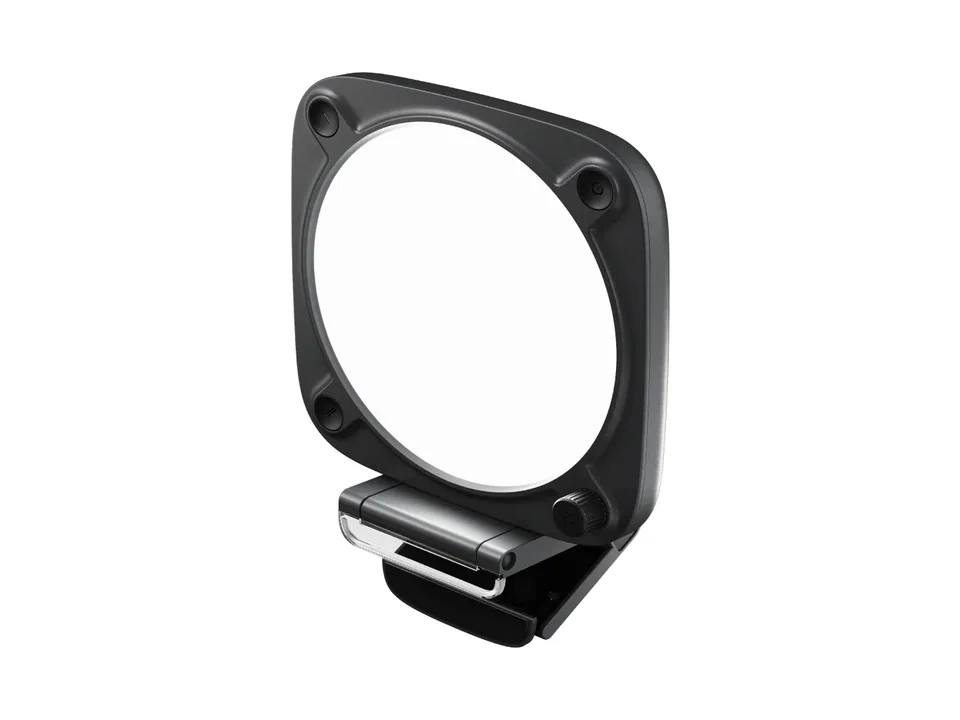
A webcam in a dark room turns grainy, whatever it costs. The Elgato Key Light Neo clips on top of the monitor and puts soft, even light on your face, from warm to cool white. It runs over USB, but only reaches its full brightness with a 3A power supply that is sold separately: from a USB-A port it gives about 400 lumens. Its buttons work without software, and a Stream Deck can control it over Wi-Fi.
For colour behind you, the Elgato Light Strip Pro is a 2 m strip whose LEDs each show their own colour, so it can run gradients across a shelf or the back of the desk, and it reacts to your Stream Deck. It cannot be extended beyond 2 m, and it was out of stock in France when we checked.

Skip the strip if the budget is tight: a lit face matters far more than a coloured wall.
Step 4: a webcam
The Elgato Facecam Neo films 1080p at 60 fps with autofocus, which matches the smooth 60 fps most game streams run at. It works in OBS without drivers, its 77 degree view frames you without the whole room, and Elgato's free Camera Hub app lets you set exposure and colour by hand, so the image stays steady when the game lights your face. It is only sold in white, the USB-C cable is fixed, and no USB-A adapter comes in the box.
On the smallest budget, the Logitech Brio 100 films 1080p at 30 fps with fixed focus: fine for a face cam in a corner of the stream. If you stream yourself moving around, cooking or crafting, the Insta360 Link 2 sits on a gimbal that follows you, films in 4K with HDR and handles dim rooms better. It costs several times more.


Skip the Link 2 if you stay seated: a fixed 1080p60 camera and a good light do the job. Our webcam picks compare more models.
Step 5: a Stream Deck
Changing scenes, muting the mic or starting a clip with the mouse while you play does not work for long. The Elgato Stream Deck Neo gives you eight LCD keys for OBS scenes, mute and shortcuts, with the same plugins as the bigger models. The Elgato Stream Deck + adds four push dials and a touch strip: turn a dial to balance game, music and mic levels live, or to dim the Key Light Neo. It has only eight keys too, and takes more desk space.


Skip the Stream Deck + if you do not mix audio live: the Neo covers scenes and mute for much less. Which Stream Deck to buy compares the whole range.
Step 6: a headset that keeps the game out of the mic
Speakers on a streaming desk mean your mic picks up the game. A closed headset solves that. The SteelSeries Arctis Nova 5 is light, lasts up to 60 hours and switches to Bluetooth for your phone, and SteelSeries Sonar on the PC adds AI noise cancellation to its retractable mic. It does not support Xbox. On a tighter budget, the wired Razer BlackShark V2 X does the job for little money.


Step 7: a second screen for chat and OBS
Reading chat on the game screen means alt-tabbing all evening. A cheap second screen fixes it. The Dell 24 Plus S2425HSM is one of the cheapest monitors we list, and its stand adjusts in height and pivots, so you can turn it vertical for a long chat column. It connects over HDMI only.
To keep cables short, the Corsair MM700 RGB Extended is a large RGB desk mat with two USB ports in its corner: plug the webcam or the mic there, close to where they sit.


Skip the second screen if you already have an old monitor: any 1080p screen works for chat.
Where the money goes
The tower is most of the budget. On the streaming side, the mic comes first, the light second and the webcam third; together they cost less than the game screen. The Stream Deck Neo and the second screen come next, and the light strip, the Stream Deck + and the Link 2 are upgrades for later.
Quick summary
- PC: ZOTAC MEK 5050 (US) or PC Gamer Blink (France), then 32 GB of memory.
- Mic: Yeti GX, or the Yeti Orb or SoloCast 2 in a quiet room.
- Light: Key Light Neo, then the Light Strip Pro for the background.
- Camera: Facecam Neo, or the Brio 100 on a budget.
- Controls: Stream Deck Neo, or the Stream Deck + to mix audio.
- Headset: Arctis Nova 5.
Our Budget Frag setup shows the gaming side of this desk:

Budget Frag
A full 1080p gaming desk at entry-level money, with a 320 Hz screen and RGB everywhere it is free.
8 components
The camera, light, mic and Stream Deck + from this guide all sit on our white Pastel Stream desk, around a much pricier PC. When you are ready to grow, the streaming setup guide covers XLR mics and capture cards, and the Setup Builder can build the rest around the streaming use case.
Written by
Setuplify Lab, Editorial team
The Setuplify team builds, photographs and takes apart desk setups so you can pick parts with confidence.
See it on a desk
Setups from this guide, with every component listed.
Budget Frag
A full 1080p gaming desk at entry-level money, with a 320 Hz screen and RGB everywhere it is free.
$1,8848 components

Pastel Stream
An all-white streaming desk where the camera, the light and the microphone are as considered as the PC.
$5,95311 components
Keep reading

Setup guide 6 min read
How to build a streaming setup, step by step
Microphone, arm, headphones, light, camera, capture card and Stream Deck: what to buy in which order, with real products for each step and three ways to put it together.
Buying guide 7 min read
Which Stream Deck to buy: Neo, MK.2 or Stream Deck +
Eight keys, fifteen keys, or eight keys and four dials: what each Stream Deck is good at, how many keys you really need, and when an editing keyboard is the better buy.
Setup guide 8 min read
The budget gaming setup: the cheapest full desk that plays recent games
An entry RTX 5050 tower, a fast 1080p screen, a cheap mouse, keyboard and headset, then a real chair and a desk. The full budget gaming desk, slot by slot, and how it differs between the US and France.

Best of 7 min read
The best streaming microphones, from your first USB mic to a broadcast chain
USB or XLR, dynamic or condenser, and what to pair with each: our streaming mic picks for every budget, plus the interface and arm that make them work.

Best of 6 min read
The best webcams for streaming and video calls
A 1080p60 streaming webcam, a video call camera with auto-framing, a 4K premium pick and a budget classic, plus the light that improves all of them.
Questions people ask
Can a budget RTX 5050 PC stream and game at the same time?
Yes, for 1080p streams. NVIDIA graphics cards include a hardware video encoder that OBS can use, so the processor stays free for the game. Plan to move from 16 GB to 32 GB of memory, because a game, OBS and a browser fill 16 GB quickly.
What should I buy first for a streaming setup on a budget?
A USB microphone, then a light for your face, then a webcam. Viewers forgive a soft picture much sooner than bad sound, and a cheap light improves any webcam. A Stream Deck Neo for scenes and mute comes next.
Dynamic or condenser USB mic for streaming next to a mechanical keyboard?
Dynamic. A dynamic supercardioid mic like the Logitech G Yeti GX only hears what is right in front of it, so keyboard clicks stay quiet. Condenser mics like the Yeti Orb or HyperX SoloCast 2 sound great in a quiet room but pick up more of the keyboard.