How to5 min read
How to manage desk cables, step by step
Get the power strip off the floor, route every cable along one path and cut the cables to your laptop down to one, with cheap IKEA parts and a few smart upgrades.
By Setuplify Lab

Some links on this page are affiliate links: we may earn a commission, at no extra cost to you. It never changes our picks. How we make money
Good cable management comes down to three moves: get the power strip off the floor and under the desk, run every cable along one path, and reduce the number of cables in the first place. You can do the first two for very little with an IKEA FÖRSÄSONG tray and a TRIXIG clip set. Here is the order we follow.
1. Unplug everything and make a list
Before buying anything, take every cable off the desk and note where each one goes: monitor power, PC power, speakers, chargers, USB, audio. Most desks have two groups: power cables that go to the wall, and data cables that run between devices. They follow different paths, so sort them now.
2. Get the power strip off the floor
This is the step that changes the most. A power strip on the floor means a tangle under your feet and a dozen cables hanging off the back of the desk. Lift it under the desk, and most of those cables become a few centimeters long.
The cheapest way is the FÖRSÄSONG tray: a 38 cm (15 in) steel mesh basket that clamps under the desk edge without drilling, holds up to 3 kg (enough for a power strip and the chargers plugged into it) and comes with two cable straps. The mesh lets chargers breathe. Its clamps fit tops from 1.2 to 4 cm thick, and at 38 cm it is short, so a wide desk may need two.
IKEA Cable organiser
A 15 in (38 cm) steel mesh tray that clamps under the desk edge to hold a power strip and loose cables.
Under-desk tray
On a wide desk, a longer tray holds the whole power strip and every brick. The FlexiSpot CMP051 is an 80 cm sheet steel tray with a slotted bottom that lets adapters cool, rated for 2 kg. The Oakywood under-desk tray is a 100 cm powder-coated steel channel on a hinged bracket that swings down when you need to reach a plug, with a five-year warranty; it screws into the desktop and needs a standing desk at least 124 cm wide or a fixed desk from 140 cm.
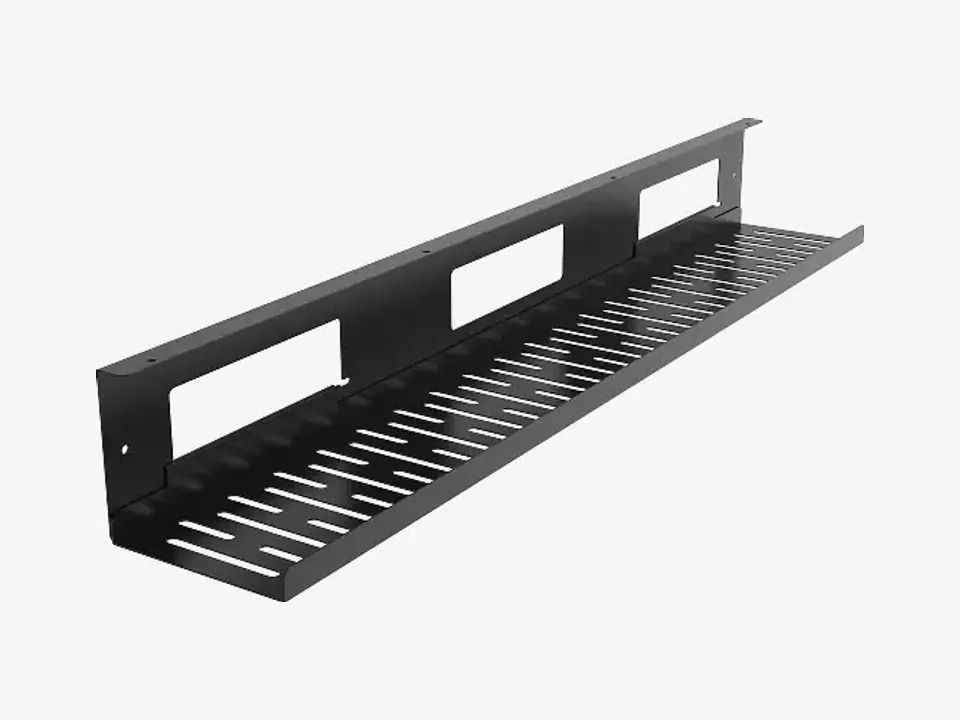
FlexiSpot Cable organiser
FlexiSpot Cable Management Tray CMP051 (80 cm, Black)
- Under-desk tray

Oakywood Cable organiser
Oakywood Under-desk Cable Management Tray (Large, Black)
- Under-desk tray
Some desks have this built in. The IKEA MITTZON has a felt cable tray and a lidded module sized for a power strip. The FlexiSpot E7 Pro comes with a cable tray, a magnetic cable cover and clips. The Secretlab MAGNUS Pro goes furthest: its power supply sits inside a leg, so one cable feeds the desk and its outlets, and a full-length tray hides behind a hinged cover. Secretlab's magnetic cable management bundle finishes the job on a MAGNUS or any steel desk: magnetic sheaths hide the cords down the legs and anchors hold loose cables, with no screws or adhesive. It will not hold on wood, bamboo or aluminum.
3. Run everything along one path
Pick one route from the desk to the wall, usually down the desk leg nearest the outlet, and send every power cable along it. Then fix it in place:
- Adhesive holders on the underside of the desk and the back of the monitor stand keep data cables in line.
- Nail-in clips run a cable neatly along a wall or baseboard.
The TRIXIG set has both: 100 nail-in clips in two sizes, for thick power cords and thin USB cables, and 50 self-adhesive holders in white and black. The adhesive ones only stick to clean, smooth surfaces, so wipe first. The nail-in clips need a hammer and leave small holes, which matters in a rental.

IKEA Cable organiser
A box of 150 clips and adhesive holders to pin cables along walls, desk legs and furniture, for the price of a sandwich.
Complete kit
4. Use the monitor arm as a cable channel
If you use a monitor arm, it is the best cable path from the screen to the desk edge. The Ergotron LX has clips along the arm, and the Herman Miller Lima has guides at four points. Leave a small loop at each joint, so the screen can tilt and swivel without pulling. Our monitor arm guide covers the options.
5. Cut cables at the source
The tidiest cable is the one you do not need. A wireless keyboard and mouse remove two cables from the desk surface. For a laptop, a dock does the most: the CalDigit TS5 connects monitors, drives, Ethernet and audio, and charges the laptop at up to 140 W, all through one cable. On a smaller budget, the Anker Nano 8-in-1 hub gives you two HDMI outputs, USB ports and card readers with up to 85 W pass-through charging; note that on macOS both external screens show the same image. In between, the Anker Prime dock has its own 160 W power supply, two HDMI outputs, Ethernet and plenty of USB, with up to 100 W for the laptop (it also mirrors the two screens on macOS). Our one-cable laptop desk setup helps you pick between the three.


Anker Accessory
Anker Prime Docking Station (14-in-1, Dual Display, 160W)
- Dock / hub

6. On a standing desk, leave slack
A standing desk travels about 60 to 65 cm between its lowest and highest positions. Every cable that runs from the desk to the floor or the wall needs that much slack, gathered in one loose loop near the leg. When you finish, raise the desk to full height once and watch for anything that pulls tight. In France, FlexiSpot's CMP017 cable spine carries that bundle in one column of snap-together links that bends as the desk moves; its top hook screws under the desktop.
Quick checklist
- Power strip under the desk.
- One path to the wall.
- Clips and holders along that path.
- Screen cables through the arm.
- Fewer cables with wireless gear and a dock.
- Slack for a standing desk.
Building a new desk from scratch? Our standing desk picks note which desks include cable management, and the Setup Builder helps you plan the whole setup. You can also browse all cable management.
Written by
Setuplify Lab, Editorial team
The Setuplify team builds, photographs and takes apart desk setups so you can pick parts with confidence.
See it on a desk
Setups from this guide, with every component listed.

Standing Ops
A sit/stand home office set up for back-to-back video calls.
$1,84511 of 12 parts sold here12 components

Signal Noir
A black OLED gaming desk where a single green line of light sets the mood.
$4,3188 of 9 parts sold here9 components
Keep reading
Setup guide 8 min read
How to build a one-cable laptop desk setup
Plug in one USB-C cable and get your monitors, keyboard, network and charging: which dock fits your laptop, how to raise or park the laptop, and where to hide the rest.

Best of 7 min read
The best standing desks, plus the fixed desk to buy on a budget
Four dual-motor sit/stand desks for different rooms and setups, and the cheap fixed desk to start with if a standing desk is not in the budget yet.

Best of 6 min read
The best monitor arms for one or two screens
A buy-once arm, a cheap gas spring arm, a dual arm for two screens and a white arm for light setups, plus the four checks to make before you order.

Best of 6 min read
The best cheap desk upgrades that change how your setup feels
Small purchases with a big effect: a monitor arm, a desk mat, a cable kit, a lamp, a light bar, a hub, a headset stand, a laptop stand and speakers. What each one fixes, and who can skip it.

How to 4 min read
How to set up an ergonomic desk, step by step
Chair first, then desk height, monitor height and distance, keyboard and mouse, and lighting: the order that works, with our gear picks for each step.
Questions people ask
How do I hide desk cables without drilling?
Use a clamp-on tray such as the IKEA FÖRSÄSONG for the power strip (it fits tops 1.2 to 4 cm thick) and adhesive cable holders for the rest. The adhesive holders in the IKEA TRIXIG set stick to clean, smooth surfaces with no tools.
How much cable slack does a standing desk need?
Enough for the full travel of the desk, about 60 to 65 cm on the desks we recommend. Gather it in one loose loop near a leg, then raise the desk to full height once to check that nothing pulls tight.
Do I need a dock for a laptop desk setup?
If you plug in more than a charger and a mouse, a dock or hub saves you connecting several cables every day. The CalDigit TS5 does it all through one cable with up to 140 W of charging; the Anker Nano 8-in-1 hub is the budget option, with two independent screens only on Windows.