Explainer7 min read
Keyboard sizes explained: full size, TKL, 75%, 65% and 60%
What each keyboard size keeps and drops, how wide each one really is on the desk, and which size suits gaming, office work, coding and small desks, with a real keyboard for each.
By Setuplify Lab
Some links on this page are affiliate links: we may earn a commission, at no extra cost to you. It never changes our picks. How we make money
Keyboard sizes are named after how much of a full keyboard they keep. Short answer: keep a full size if you type numbers all day, pick a TKL or a 75% for a desk that does work and games, and go down to 65% or 60% only if you game at low sensitivity or carry the keyboard around and can live with a function layer. The percentage is a rough family name, not a precise measurement, so the width in millimetres is the number to compare.
The sizes at a glance
- Full size (100%). Letters, function row, navigation cluster (Insert, Home, Page Up...), arrows and a number pad. Around 430 to 450 mm wide.
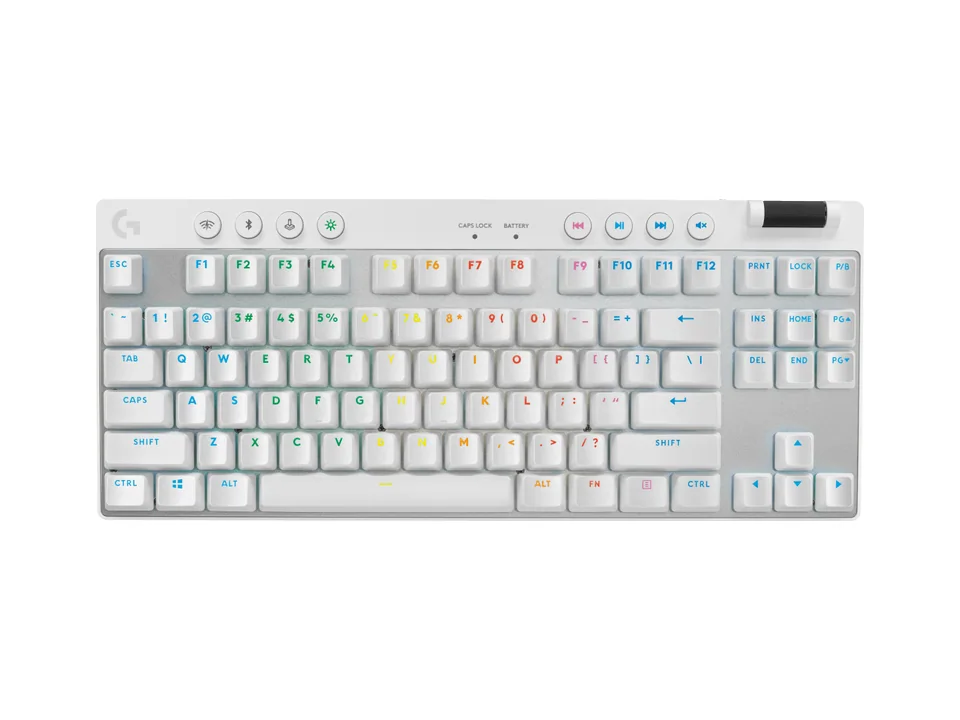
- TKL, or tenkeyless (about 80%). A full size without the number pad. Everything else stays where you expect it. Around 345 to 370 mm.
- 75%. Keeps the function row and arrows, but squeezes them against the main block and folds the navigation keys into a single column. Around 300 to 330 mm.
- 65%. Drops the function row. Arrows stay, with a few navigation keys on the right edge. Around 305 to 325 mm.
- 60%. Drops the function row, arrows and navigation keys. Only the main block is left, and everything else goes on a function layer.
Two other shapes cross these sizes. Compact full size boards like the Logitech Wave Keys keep a number pad but tighten the spacing. Low-profile boards, like the Keychron K3 Max, are about height, not width: they can be any size.
Real widths, measured by the makers
The width decides where your mouse lands, so here are the figures from the manufacturers' pages for boards in our catalogue:
- Full size: Corsair K70 CORE 448 mm, Logitech MX Keys S 430 mm.
- Compact full size: Logitech Wave Keys 376 mm.
- TKL: Logitech G515 LIGHTSPEED TKL 368 mm, Logitech G413 TKL SE 355 mm, Logitech G PRO X TKL LIGHTSPEED 352 mm, Wooting 80HE 346 mm.
- 75%: Keychron Q1 Max 327.5 mm, Logitech G316 X 75 327 mm, Logitech MX Mechanical Mini 313 mm, Keychron K3 Max 306 mm.
- 65%: HyperX Origins 2 65 324 mm, ASUS ROG Falchion RX Low Profile 306 mm.
- Compact without a number pad: Logitech MX Keys Mini 296 mm, Logitech Pebble Keys 2 K380s 279 mm.
Two things stand out. Going from full size to TKL saves the most space, around 80 mm, which is a whole mouse width. Below that, sizes overlap: a well-built 75% can be as narrow as a 65%, because frames and bezels differ from one brand to the next.
Full size: for numbers and macros
Keep the number pad if you enter figures every day: accounting, spreadsheets, data entry. A full board is also where gaming macro keys live. The Razer BlackWidow V4 X adds six dedicated macro keys down the left side, handy for streamers and MMO players, and the MX Keys S is the quiet office standard.


The cost is reach. With the letters centred in front of you, a full board pushes the mouse about a mouse width further right, and over a long day your right shoulder ends up rotated outward. If that sounds familiar, read our ergonomic desk setup guide.
TKL: the safe compact
A tenkeyless keeps every key most people use outside of number entry, in the same place as on a full board. Nothing to relearn, and your mouse moves closer. That is why it is the default size for esports players who want all their keys, and a good choice for work too.
Logitech Keyboard
Logitech G PRO X TKL LIGHTSPEED
- Tenkeyless
- Tactile
- Wired + wireless

The G PRO X TKL LIGHTSPEED is a wireless tournament board with a white option, and the G413 TKL SE is the cheapest real mechanical TKL from Logitech G, with PBT keycaps and an aluminium top. The Wooting 80HE calls itself 80%: a TKL with a slightly tighter navigation block.
75%: the best all-rounder
A 75% keeps the function row and arrows, which matter for coding, shortcuts and spreadsheets, and gets within a few centimetres of a 65% in width. Navigation keys shrink to one column on the right, so Home and End often move to a layer. For a desk that does work by day and games at night, this is the size we recommend most.


The K3 Max is a thin, wireless mechanical 75% with remappable keys, and the MX Mechanical Mini is the quiet office version, with Tactile Quiet switches and a Logi Bolt receiver in the box.
65%: arrows yes, function row no
A 65% drops the function row. F5, F11 and the like move to a layer, usually Fn plus a number key. You keep dedicated arrows, which a 60% loses, so it is the smallest size that stays comfortable for everyday navigation and editing.

HyperX Keyboard
A compact wired 65% gaming keyboard with hot-swap sockets, HyperX Red linear switches, 8,000 Hz polling and per-key RGB.
65%LinearWired
The HyperX Origins 2 65 is a hot-swappable wired 65% with linear switches and 8,000 Hz polling, at a fair price. If you use F-keys for work shortcuts or debugging, a 75% will annoy you less.
60%: the most room for your mouse
A 60% keeps only the main block. Arrows, Delete, F-keys and navigation all live on layers. In exchange, you get the narrowest board and the most room for wide, low-sensitivity mouse swipes, which is why it is popular with FPS players.

Razer Keyboard
A 60% wired esports keyboard with analog optical switches, Rapid Trigger, 0.1 to 4.0 mm adjustable actuation and Snap Tap.
60%LinearWired
The Razer Huntsman V3 Pro Mini adds analog switches with Rapid Trigger to the format. It is a gaming tool first: as a work keyboard, the missing arrows get old quickly.
Living with a function layer
On every size below TKL, some keys move to a second layer. A few habits make it painless:
- Learn the three or four combos you use daily (arrows, Delete, Home and End) before judging a small board.
- Remap when you can. Boards with QMK or VIA support, like the K3 Max and the Keychron Q1 Max, let you put any key on any layer.
- Mind your games. Some games bind F-keys or the number pad. Check your key bindings before you drop them.
Which size for what
- Spreadsheets, accounting, data entry: full size, or a compact full size like the Wave Keys.
- Gaming with all keys: TKL.
- Work and games on one desk, coding: 75%.
- FPS at low sensitivity, small desk: 65% or 60%.
- Laptop bag, tablet, travel: a compact low-profile board like the MX Keys Mini or the Pebble Keys 2.
Quick summary
Full size keeps everything and costs the most desk space. TKL drops only the number pad and is the safe compact. 75% is the best all-rounder. 65% gives up the function row, 60% the arrows too. Compare widths in millimetres rather than percentages.
For our picks in each size, read the best compact keyboards. For full lists by use, see the best gaming keyboards and the best keyboards for work, look at a real small desk in our Compact Corner setup, or try sizes in the Setup Builder. Every model is in all keyboards.
Written by
Setuplify Lab, Editorial team
The Setuplify team builds, photographs and takes apart desk setups so you can pick parts with confidence.
See it on a desk
Setups from this guide, with every component listed.

Compact Corner
A full gaming setup in a bedroom corner, between the bed and the door.
$4,4756 of 7 parts sold here7 components
Keep reading
Best of 8 min read
The best compact keyboards: 60%, 65%, 75% and TKL picks
Compact keyboards for work and games, from a 60% esports board to wireless TKLs: a thin mechanical all-rounder, two Logitech office minis, a cheap Bluetooth board and gaming picks in every size.

Best of 6 min read
The best gaming keyboards, from Rapid Trigger to tight budgets
Gaming keyboards on sale today: analog boards for competitive shooters (TKL and 60%), two wireless TKLs, a moddable RGB 75%, a white 75%, a macro full-size and a budget pick. Who each one is for.
Best of 4 min read
The best keyboards for work, programming and ergonomics
Keyboards for long workdays: the quiet office standard, a cushioned ergonomic board, a compact for small desks, a quiet mechanical for calls, a premium mechanical for programmers and a thin wireless board that also games.

How to 4 min read
How to set up an ergonomic desk, step by step
Chair first, then desk height, monitor height and distance, keyboard and mouse, and lighting: the order that works, with our gear picks for each step.
Questions people ask
What is the difference between a TKL and a 75% keyboard?
Both drop the number pad. A TKL keeps the full navigation cluster and spaced-out arrows, like a full keyboard; a 75% squeezes the function row and arrows against the main keys and folds navigation into one column, so it is narrower: about 305 to 330 mm against 345 to 370 mm.
Is a 60% keyboard practical for work?
Not for most people. A 60% has no arrows, function row or Delete key: they all sit on a function layer. It shines for FPS games on a small desk. For work and games on one desk, a 75% keeps those keys and is barely wider.
What keyboard size should I get if I use a number pad?
A full-size board like the Logitech MX Keys S, or a compact full size like the Logitech Wave Keys (376 mm wide), which keeps the number pad with tighter spacing. Some people pair a TKL with a separate number pad instead.